Minimalism Is Not a Theme
2026/04/16
This is a somewhat of a long post. Read it slowly or come back to it later.
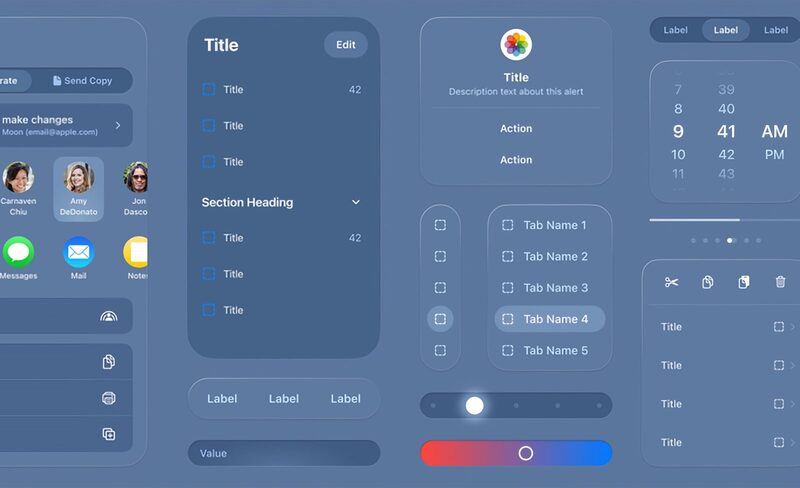
I have been seeing too many posts regarding how the above kind of design is minimal.
So let me ask you:
Does this actually look minimal to you?
If your answer is yes, then you’re not thinking about how things work— you’re only looking at how they look.
These days minimalism has been reduced to a color palette which includes things like:
- Black Background
- Blue Text
- Lots of Empty space
That’s not minimalism.
That’s styling.
Such design comes at a cost of:
- Animations that slow things down.
- Heavy frameworks doing simple things.
- Pages that look clean but feel sluggish.
What I call this is pseudo-minimalism.
A bloated system wearing a minimal skin.
The question naturally arises: What does that “Minimal” site actually contain?
- Multiple JavaScript frameworks stacked together
- Over-engineered solutions to simple problems
- Dead code that nobody wants to touch
- A site that breaks without JavaScript
- Growing technical debt
Is that minimalism? Not even something close to it.
Now compare that to an actually minimal site:
- Fast
- Simple
- Responsive
- Doesn’t get in the way
It does one thing, and it does it well. (Unix philosophy)
No layers of abstraction.
No unnecessary dependencies.
Why Should I Even Care?
Because “it works” is not the same thing as “it is good.”
A lot of software works the way a chair with one broken leg still “works.” You can sit on it. Until you cannot. Until the cracks start showing. Until the maintenance becomes the real product. If something is slow, fragile, bloated, and annoying to change, then yes, it technically works. That is a very low bar.
“Don’t Fix It If It Isn’t Broken”
That phrase is used to excuse decay.
Something can be broken in ways that are not immediately visible. It can be slow. It can be fragile. It can be impossible to maintain. It can be dependent on layers of nonsense holding it together. People say “don’t fix it” because they do not want to confront the cost of keeping bad systems alive.
If it is hard to change, hard to reason about, and hard to maintain, it is already broken. It just has not collapsed yet.
“Isn’t My Job Just to Get Things Done?”
Yes. Exactly.
That is why this matters.
A bloated system wastes time. It makes simple tasks slower. It forces you to work around unnecessary complexity. Minimal software does the opposite. It gets out of your way. It lets you do the thing without making you fight the tool first.
The goal is not to admire software. The goal is to use it.
“I Don’t Care About Software, I Just like the Aesthetic”
Then you care about the wrong part.
Aesthetic minimalism is easy. Anyone can make a black page with some blue text and call it a day. Real minimalism is harder because it affects behavior, not just appearance. A clean look means nothing if the system underneath is a mess.
A beautiful interface that is slow, fragile, and dependency-heavy is just decoration on top of poor design.
“Isn’t Minimal Software Hard to Maintain?”
No. Bad software is hard to maintain.
This confusion exists because people keep building complex systems and then calling them minimal after they remove the colors.
True minimalism is easier to maintain because there is less of it. Fewer moving parts. Fewer dependencies. Fewer weird edge cases. Less garbage to remember.
Yes, it takes thought to make something simple. But once it is simple, it stays simple. That is the entire point.
“Doesn’t It Take a Lot of Planning and Effort?”
Only if you are doing it properly.
Minimalism is not laziness. It is restraint. It means thinking before adding things, instead of adding things first and hoping they do not become a problem later. The effort goes into removing what does not belong, not into piling more on top.
That is why pseudo-minimalism is so common. It is easier to make something look clean than to make it actually clean.
“Is True Minimalism Even Possible When Scope Keeps Expanding?”
Not if you let everything in.
Scope expansion is not a law of nature. It’s a choice.
What usually happens is this:
- One feature gets added
- Then another “small” improvement
- then integration
- then analytics
- then personalization
Now you don’t have a product anymore. You have a pile.
Minimalism doesn’t mean “never add features.” It means every addition has to justify its existence. Every line of code must be intended.
Most systems don’t fail because they grow. They fail because nothing is ever removed.
A minimal system can grow. It just doesn’t grow blindly.
“If True Minimalism Is So Good, Why Is It So Rare?”
Because it’s harder.
Not technically harder. Mentally harder.
It’s easy to:
- Add a library
- Add a feature
- Follow a trend
It’s hard to:
- Say no
- Remove things
- Keep something simple over time
Pseudo-minimalism wins because it’s convenient.
It gives you the appearance of simplicity without forcing you to actually simplify anything.
Real minimalism requires restraint. And restraint doesn’t scale well in teams, deadlines, and corporate environments.
Minimalism is rare for the same reason good software is rare.
It requires saying no more often than yes.
And most systems are built on “yes”.
Until now we’ve only been talking in the air without establishing a clear ground for what it actually is:
Pseudo-Minimalism
Pseudo-minimalism is a design and development approach that prioritizes the appearance of simplicity over its actual implementation. It presents a clean, sparse visual style—often using limited colors, whitespace, and restrained layouts—while hiding a complex, inefficient, and dependency-heavy system underneath.
Some characteristics of Pseudo-Minimalist software include:
- Aesthetic simplicity, structural complexity — looks clean but is built on layered frameworks and abstractions
- Performance trade-offs — slow load times, excessive animations, or unnecessary scripts
- Over-engineering — simple problems solved with complex tooling
- Fragility — core functionality breaks without JavaScript or heavy dependencies
- Hidden technical debt — unused code, difficult maintenance, and poor long-term scalability
How to Actually Spot Pseudo-Minimal Software
Let’s list out a few red flags to stop and help you avoid Pseudo-Minimal Software:
-
If Something Looks Fast, but When You Use It It Doesn’t Feel like It:
- Noticeable delay on clicks or navigation
- UI animations masking loading time
- Content appearing in stages instead of immediately
Basic rule of thumb: If a “simple” page takes seconds to become interactive, it’s not minimal.
Principle : A truly minimal app responds instantly.
-
It Breaks (or Degrades Badly) Without JavaScript:
Disable JavaScript and Reload the Page. If:
- Blank page or loader is stuck forever
- Basic content (text, navigation) disappears
- Entire app depends on client-side rendering
Basic rule of thumb: If nothing works without JS, the simplicity is fake.
Principle: Minimal systems respect core web functionality.
-
Network Activity Is Disproportionate:
Check DevTools → Network Tab:
- Page size (MBs for a basic site?)
- Number of requests
- Multiple large JS bundles
Red flags:
- 1–5 MB+ just to show text/content
- Several frameworks or duplicated libraries
- Fonts, animations, trackers outweigh actual content
Rule of thumb: Small Pages shouldn’t load massive amounts of data.
Principle: Minimal UI doesn’t require massive downloads.
-
Overuse of Frameworks for Trivial Features:
Red Flags:
- A static page powered by heavy frameworks
- Multiple frameworks layered together
- Dependency chains for basic UI behavior
Rule of thumb: If removing 80% of the stack wouldn’t change the outcome, it’s pseudo-minimal.
Principle: Simple problems don’t need complex stacks.
-
Animation over Function:
Red Flags:
- Delays caused by transitions
- Scroll-triggered effects that slow interaction
- UI elements that “fade in” instead of just appearing
Rule of thumb: Animations shouldn’t slow you down.
Principle: Minimalism values immediacy, not theatrics.
-
High Resource Usage for Simple Tasks:
Watch out For:
- High CPU usage when idle
- Fans spinning up for basic interactions
- Excessive memory consumption (hundreds of MBs for a simple page)
- Battery drain on mobile for static content
Red flags:
- A “lightweight” app using more resources than complex tools
- Memory usage steadily increasing over time (memory leaks)
- Lag or stutter on low-end devices
Rule of thumb: If simple actions consume heavy resources, it’s not minimal.
Principle: Minimal systems respect device constraints and stay efficient.
-
Hidden State & over-Engineering:
Red Flags:
- Complex state management for simple UI
- Excessive abstraction layers
- Hard-to-trace data flow
Rule of thumb: If it’s hard to reason about, it’s not minimal.
Principle: Minimal systems prioritize clarity and predictability—state and data flow should be simple enough to understand at a glance.
Examples of Pseudo-Minimalism and Its Cost
Let’s be honest these days most of the sites and software claiming minimalism is actually Pseudo-Minimalism. Let’s see some of them:
Apple
Apple is often seen as the gold standard of “minimal design”, as on the surface visually it is somewhat true, but the animations comes at the cost of slowing both you and your computer or phone down.
The complex software ecosystem of apple includes:
- Multiple operating systems
- Deep hardware-software integration
- Massive internal frameworks
- Thousands of components working together
All of that comes with a risk.
Apple regularly patches zero-day vulnerabilities—bugs already being exploited in the wild.
- A memory corruption flaw allowed arbitrary code execution on iPhones. SecurityWeek
- WebKit bugs could be triggered just by visiting a malicious web page. Fox News
- Multiple zero-days have been exploited in targeted attacks across iOS versions. SecurityWeek
That’s not because the software engineers at apple can’t design secure software, they should have the worlds top talent. But:
The more layers you have, the more places things can break.
Slack
On the surface it looks simple it’s just a chat app right?
Well behind that simple user interface, it’s made up of:
- Real Time Systems
- APIs
- Deep Integrations
- Authentication Layers
And when something small fails, it cascades.
In 2024:
- Attackers used compromised employee credentials.
- Gained unauthorized access.
- Exposed internal messages and data. Huntress
Even earlier:
Stolen tokens allowed access to private code repositories. Slack
Again:
- Not a UI problem.
- A complexity problem.
Notion (and Similar Tools)
Notion looks like a blank page.
Minimal.
But it is:
- A database
- A document editor
- A collaboration tool
- A syncing engine
- A plugin ecosystem
All pretending to be “just notes”.
That’s not minimalism. That’s compression of complexity into one interface.
And when systems like this fail:
- Syncing breaks
- Data conflicts happen
- Performance degrades
You don’t see the complexity. Until it shows up.
All of These Systems Share the Same Structure:
- Simple surface
- Complex core
- Heavy dependencies
- Constant patching
And from a security perspective:
Every layer is another place for something to go wrong.
- More code → more bugs
- More dependencies → more vulnerabilities
- More features → more attack surface
This is how software behaves at scale.
In true sense, some systems need to be complex.
- Operating systems.
- Distributed systems.
- Global communication platforms.
The problem is not complexity. The problem is:
Prioritizing building a surface level system to attract customers, than too actually test it.
True Minimalism
True minimalism is the deliberate removal of everything that does not improve function, clarity, speed, or long-term maintenance. It is not about looking empty. It is about being simple in structure, predictable in behavior, and cheap to maintain.
What All Does True Minimalism Value?
Speed
A minimal system doesn’t make you wait.
It doesn’t “feel fast”; due to psychological tricks like a loading screen. It is fast.
Clarity
You shouldn’t have to figure things out.
If I have to stop and think, your design already failed. Minimal systems don’t explain themselves with tooltips and guides.
They’re obvious. You look at it, and you know what to do.
Predictability
Nothing weird or out of box should happen.
I click a button—it does the thing. Nothing else. Not something extra. Not something “smart”.
Minimal systems don’t try to impress you. They behave.
Every time.
Low or No Maintenance
If it constantly needs fixing, it’s not minimal.
It’s fragile.
Minimal systems don’t come with a maintenance schedule. They don’t break because one dependency updated.
They just sit there and keep working.
Resilience Without Extra Dependencies
If your app collapses without JavaScript, it was never simple.
It was held together.
Minimal systems don’t need a stack of tools just to exist.
Remove a layer, and it still works. Remove another, and it still works.
That’s simplicity.
Directness
No detours. No delays.
I do something—it happens.
No animations slowing me down. No extra steps. No “experience”.
Just result.
“Can We Quantitatively Measure True Minimalism?”
Yes but not in a way that one might think.
One common method is too simply look at total number of the lines of code. This doesn’t work because of the following:
- Lines of code are not a law. They are more like a smell test. While it can give a general idea it’s highly susceptible to different factors.
- A line in assembly, a line in C, and a line in JavaScript do not carry the same weight.
- Some projects are required to do more than the other.
- Different people have different levels of understanding of the code they are working on. What might be difficult for one person to wrap his head around my be easy for another.
A Better Line Is Not “How Many Lines Is Acceptable,” But:
- How many concepts does the project contain?
- How many dependencies does it rely on?
- How many things can break?
- How much of the code exists just to support the rest of the code?
If you ask yourself the following questions, you will naturally have an idea of the bloat and unnecessary spaces that need to be removed.
“What Level Is Acceptable?”
A project is healthy when:
- It solves a real problem
- The structure is understandable
- The dependencies are justified
- Adding a feature does not require surgery
What Starts to Smell?
It is bloated when:
- The codebase keeps growing but the purpose does not
- Simple changes require touching too many files
- The stack exists mostly to support itself
- Maintenance becomes the main activity
When to Start Over
A rewrite is worth considering when:
- The architecture is fighting you
- Fixing one part breaks three others
- The code is now shaped by old mistakes
- Removing bloat would be harder than rebuilding cleanly
A project is fine when it stays understandable, maintainable, and honest about what it is. It becomes a problem when every new feature makes the system harder to reason about, harder to change, and harder to trust.
There is no universal line where bloat begins. There is only the point where a project starts serving its own complexity instead of its purpose. That is when pruning stops being optional.
Always use your mind and trust your gut than to blindly follow some metric :)
Now let’s give you a real example of a “True Minimal Software”
Prepare your eyes because you don’t need to look any further it’s this page. ¬‿¬
This site is built by one person, in a few hours, on a phone, with a virtual keyboard. No IDE. No fancy setup. Just Termux and Neovim.
It took its first steps as the clone of a Hugo theme XMin by Yihui Xie.
A super minimal theme which in its default configuration is only 137 lines; including empty lines. Yes only 137 lines(127 without counting the empty lines).
After a few hours of work my version of the theme was born which can be tested by this command:
find . -not -path '*/public/*' \( -name '*.html' -o -name '*.css' \) \
-exec sh -c '
  total=0
  for f do
    c=$(grep -vc "^[[:space:]]*$" "$f")
    printf "%5d %s\n" "$c" "$f"
    total=$((total + c))
  done
  printf "%5d total\n" "$total"
' sh {} +
Which generated the following output:
   40 ./layouts/404.html
   15 ./layouts/_partials/foot_custom.html
    9 ./layouts/_partials/footer.html
    1 ./layouts/_partials/head_custom.html
   28 ./layouts/_partials/header.html
   23 ./layouts/list.html
   29 ./layouts/single.html
   23 ./layouts/section.html
    8 ./layouts/shortcodes/recent.html
   23 ./layouts/taxonomy.html
   23 ./layouts/term.html
    3 ./layouts/index.html
   38 ./layouts/_default/baseof.html
  178 ./static/assets/css/main.css
  441 total
Mine is 441 lines… yes, I increased the original length by about 3.5 times.
And yet, it is still minimal.
Let’s see why by answering the questions from above:
How Many Concepts Does It Contain?
Very few.
- Pages
- Posts
- Tags
- Categories
- RSS Feed
That’s it.
No hidden systems. No layers pretending to be something else.
You can understand the entire structure in minutes.
How Many Dependencies?
One.
Hugo.
- No frameworks.
- No runtime.
- No external services.
The output is just HTML and CSS.
How Many Things Can Break?
Almost nothing.
- No JavaScript → no runtime errors
- No client-side logic → no hydration issues
- No APIs → no network failures
If something breaks, it’s just a file.
And files are easy to fix.
How Much Code Exists Just to Support Other Code?
Almost none.
There is no:
- Build pipeline complexity
- Dependency chains
- Layers supporting layers
The code exists to render content.
Not to support itself.
How Easy Is It to Add New Stuff?
Quite easy.
- Want a new page? Write it.
- Want a new post? Add a file.
- Want a new section? Create a folder.
No configuration hell.
No “where does this go?” confusion.
Are Any Features Unnecessary?
Some.
- Custom fonts → not required
- Syntax highlighting → useful, but optional
- Styling → completely optional
And that’s fine.
Minimalism is not about removing everything. It’s about knowing what you can remove without breaking the purpose.
Do You Need a Nuclear Reactor to Run This Website?
Let’s First start by which all browsers can you use?:
Modern Browsers?
Of course it works on all of ’em :)
Text-Based Browsers?
- Links: Yes
- Elinks: Yes
- w3m: Yes
- Lynx: Yes
Legacy Browsers?
This is where things actually get interesting:
-
Firefox 1.0 (2004): It would work perfectly except the fonts, woff2 fonts came out in May of 2014, so basically all the browsers forward wouldn’t support it.
-
Safari 1.0 (2003): Had solid CSS support, site would work perfectly, except for once again fonts.
-
Internet Explorer 6 (2001): Some CSS might break but overall the site would work almost perfect.
-
Internet Explorer 5.0 (1999): Again had CSS support so it would be fine.
-
Netscape Navigator 4.0 (1997): Had somewhat buggy CSS support but would be fine.
-
Internet Explorer 3.0 (1996): Was the first major browser with CSS support, the colors, and margins would be visible. Site works fine.
-
Internet Explorer 1 (1995): Was the first browser by Microsoft (Now better known as Microslop), default on all Windows machines, would soon take over the Netscape browser, didn’t have CSS support so would just ignore the CSS part of the page. But my site doesn’t require CSS to work it’s only there to make it look better and not burn your eyes. Would be fine.
-
Netscape Navigator 1.0 (1994): First browser that supported SSL, although would be unlikely to connect with Neocities, due to it redirecting all HTTP traffic to HTTPS which uses the modern standard of encryption (TLS 1.2 or 1.3). But if you have a copy of the site on the machine it would basically be the same as Internet Explorer 1, without any CSS. Site would work fine.
-
WorldWideWeb (1990): The first browser to be created, CSS is yet to be born, would render my site and plain text, with some links. Does it work? yes it does ;).
Therefore even though time the only thing that changes is the visual styling.
Now that we have established that even the first browser the world even created would render my site and it could be read now onto the hardware:
The real bottleneck of this website is the images from a hardware perspective.
The largest image currently on this site is a JPEG file about 273 KB, let’s see how does it hold up:
- WorldWideWeb (1990): We don’t have to worry about it as JPEG was literally standardized 2 years after it came out, so the image would be displayed as a downloadable link.
- Mosaic Netscape (1994): It was the beta version of the Netscape Navigator, it supported displaying JPEGs, although computers at that time had 4-8 MBs of RAM with the high end ones having about 16 MBs. Windows because it has always been Windows would have taken up about a lot of space plus the browser on top we can be almost certain that, on a 4MBs machine it would have lead to a crash. On 8MBs machines it may work or maybe not by using the swap space on disk. 16MBs machines would have successfully loaded the image. Moreover, we need to consider that JPEGs are compressed the browser will need to through decompression to actually show it, which is about 3.5 to 4 MBs.
Rest speaking from this point all browsers would have support for JPEG files. So let’s talk about the processors:
- Pentium 1 (1993-1996): Operated at a clock speed of 60-166MHz had about 8 to 32 MBs of RAM to work with. The image would take minutes to load as it didn’t have specialized instructions for graphics. So it would have to rely on standard math unit (FPU) for the manual calculation of every single pixel color on screen. You would painfully see the image load line by line slowly shifting the text underneath it as it calculates the image height. So it would be doable but painful.
- Pentium MMX / Pentium 2 (1997-1998): MMX or Matrix Math Extensions, added 57 new instructions specifically for graphics. Allowing the processor to process multiple pixels all at once (SIMD). The blurry version of the image would first make an appearance quickly snapping into the sharp focused image 1-2 seconds later. It would actually be usable.
- Pentium III (1999-2001): This would now be an overkill with a clock speed of 500 MHz to 1.4 GHz and 128 to 512 MBs to work with. It also introduced SSE (Streaming SIMD Extensions), basically MMX on steroids. It added 70 new instructions specifically for 3D and floating-point media. While the 2D JPEG doesn’t really need SSE, the sheer clock speed of more than 1 GHz would force it into submission by brute force, a literal joke for this processor. It would have been the “instant” experience.
Although other problems did exist like the 8-bit color problem, it’s really not worth getting into.
So in the end this site can act as an example of a “True Minimal Site” as it could technically still be usable on the very first internet browser, and any thing from even 20 years ago would handle it with ease.
In the end:
True minimalism is not about looking empty. It is about removing everything that does not earn its place. It is about speed, clarity, predictability, and control. It is about a system that respects the user, the device, and the person maintaining it later. If a site takes forever to load, if it breaks without JavaScript, if it needs a pile of frameworks to show a few paragraphs, if it keeps growing excuses instead of shrinking complexity, then it is not minimal. It is just pretending.
And that is the real problem. Most people do not want minimalism. They want the appearance of it. They want the aesthetic, the image, the branding, the shallow satisfaction of saying “look how clean this is” while the thing underneath becomes more bloated, more fragile, and more annoying to maintain with every release. They want the mask, not the restraint.
Minimalism is harder than that. It requires saying no. It requires cutting features that sound impressive but serve nothing. It requires refusing the usual corporate habit of turning every simple product into a bloated super-app that does five things badly instead of one thing properly. It requires thinking about what software is for, instead of treating complexity as a badge of honor.
So no, minimalism is not a theme. It is not a color scheme. It is not a mood board. It is not a fancy layer of polish hiding a rotten core. Real minimalism is the refusal to waste time, resources, and attention on garbage that should never have existed in the first place. Anything less is just decoration pretending to be philosophy.